
Configuration
Configuration is managed through a config/newism-imgix.php config file.
A config file should have been automatically copied to config/newism-imgix.php on installation. If it wasn't, create a newism-imgix.php file under your /config directory.
A sample config file is available in the plugin's src/config directory you can copy it from there:
cp vendor/newism/craft-imgix/src/config.php config/newism-imgix.phpConfiguration options
All scalar settings can also be set via environment variables with the CRAFT_IMGIX_ prefix. ENV vars always take precedence over config file values.
Plugin Settings
enabled
- ENV
CRAFT_IMGIX_ENABLED- Accepts
bool- Default
true
devMode
- ENV
CRAFT_IMGIX_DEV_MODE- Accepts
bool- Default
false
Imgix Settings
imgixDomain
- ENV
CRAFT_IMGIX_DOMAIN- Accepts
string
imgixDefaultParams
- ENV
none- Accepts
array|callable- Default
[]
These can be overridden by transform-specific parameters.
// As a static array
'imgixDefaultParams' => [
    'auto' => 'format,compress',
    'cs' => 'srgb',
],

// Or as a callable for per-asset defaults
'imgixDefaultParams' => function(\craft\elements\Asset $asset, ?\craft\models\ImageTransform $transform = null) {
    return [
        'auto' => 'format,compress',
        'cs' => 'srgb',
    ];
},
signingKey
- ENV
CRAFT_IMGIX_SIGNING_KEY- Accepts
string
It is recommended to use a signing key in production to prevent abuse of your Imgix source by third parties, but you can leave it blank during development if you prefer.
purgeApiKey
- ENV
CRAFT_IMGIX_PURGE_API_KEY- Accepts
string
apiBaseUri
- ENV
CRAFT_IMGIX_API_BASE_URI- Accepts
string
debugLogging
- ENV
CRAFT_IMGIX_DEBUG_LOGGING- Accepts
bool- Default
false
skipImgix
- ENV
none- Accepts
callable|bool- Default
skips non-images
By default, non-image assets ($asset->kind !== 'image') are skipped to avoid unnecessary Imgix delivery credits. To route all assets through Imgix:
'skipImgix' => false,To customise the skip logic:
'skipImgix' => function(\craft\elements\Asset $asset, ?\craft\models\ImageTransform $transform = null) {
    // Only use Imgix when a transform is explicitly applied
    return $transform === null;
},
That last example is worth calling out: it matches Craft's own behaviour, where an asset URL is only transformed if a transform was explicitly requested. This plugin routes every asset URL through Imgix by default, transform or not.
Renamed in 5.1.0
skipImgix was previously called skipTransform. The old name still works but is deprecated, and support for it will be removed in 6.0.
It was renamed because it doesn't skip a transform — it skips Imgix altogether, falling back to the filesystem URL. Compare with renderOriginal, which stays on the Imgix CDN but applies no rendering parameters.
Path Resolution Settings
includeFilesystemSubfolder
- ENV
CRAFT_IMGIX_INCLUDE_FILESYSTEM_SUBFOLDER- Accepts
bool- Default
true
includeLibraryParam
- ENV
CRAFT_IMGIX_INCLUDE_LIBRARY_PARAM- Accepts
bool- Default
true
Set to false for tidier URLs, including fully parameter-free renderOriginal URLs:
'includeLibraryParam' => false,Volume overrides
volumes
- ENV
none- Accepts
array- Default
[]
use Newism\Imgix\models\VolumeSettings;

return [
    'imgixDomain' => 'default.imgix.net',
    'volumes' => [
        'images' => VolumeSettings::create()
            ->imgixDomain('images.imgix.net')
            ->imgixDefaultParams(['auto' => 'format,compress']),
        'documents' => VolumeSettings::create()
            ->enabled(false),
    ],
];
Path Configuration
Getting the Imgix path right is the most important part of the setup. The path the plugin sends to Imgix must match how Imgix reaches the file on your origin (S3, GCS, web server, etc.).
The plugin builds the path from individual components — it does not parse the filesystem URL:
- Filesystem subfolder: included if
includeFilesystemSubfolderis true - Volume subpath: always included
- Asset folder path: user folders in CP
- Filename: the file
Final URL:{filesystem subfolder}/{volume subpath}/{asset folder path}/{filename}
For example, with an S3 filesystem configured with subfolder assets/:
Filesystem subfolder:  assets/
Volume subpath:        (none)
Asset folder + file:   Photos/beach.jpg

→ Imgix path: /assets/Photos/beach.jpg
→ Imgix URL:  https://your-source.imgix.net/assets/Photos/beach.jpg?w=800&...
Common Setups
Simple (one S3 bucket, no subfolder)
No path settings needed. The volume subpath and asset path are included automatically.
'imgixDomain' => 'your-source.imgix.net',S3 with subfolder, Imgix has NO path prefix
The default includeFilesystemSubfolder: true handles this — the S3 subfolder is included in the Imgix path.
'imgixDomain' => 'your-source.imgix.net',S3 with subfolder, Imgix source has a matching path prefix
Disable includeFilesystemSubfolder since Imgix already prepends the subfolder via its own Path Prefix setting. Otherwise the subfolder appears twice.
'imgixDomain' => 'your-source.imgix.net',
'includeFilesystemSubfolder' => false,
Multiple volumes on one Imgix web folder source
Use per-volume subPath to route each volume to the correct folder on the origin server:
use Newism\Imgix\models\VolumeSettings;

return [
    'imgixDomain' => 'your-source.imgix.net',
    'volumes' => [
        'images' => VolumeSettings::create()
            ->subPath('images'),
        'documents' => VolumeSettings::create()
            ->subPath('documents'),
    ],
];
Debugging Configuration
The plugin settings page (Settings > Plugins > Imgix) includes a comprehensive configuration debugging screen that makes it easy to verify your configuration.
Configuration summary
At the top it shows output of all config settings after they have been processed.
Volume settings
For each volume it shows:
- Filesystem details — type, base URL, subfolder, and the resolved root URL
- Volume details — subpath and root URL
- Imgix settings — the resolved settings for this volume (after merging global + per-volume overrides)
- Sample assets — real assets from the volume showing whether they're routed through Imgix or served from the filesystem, with the final URL
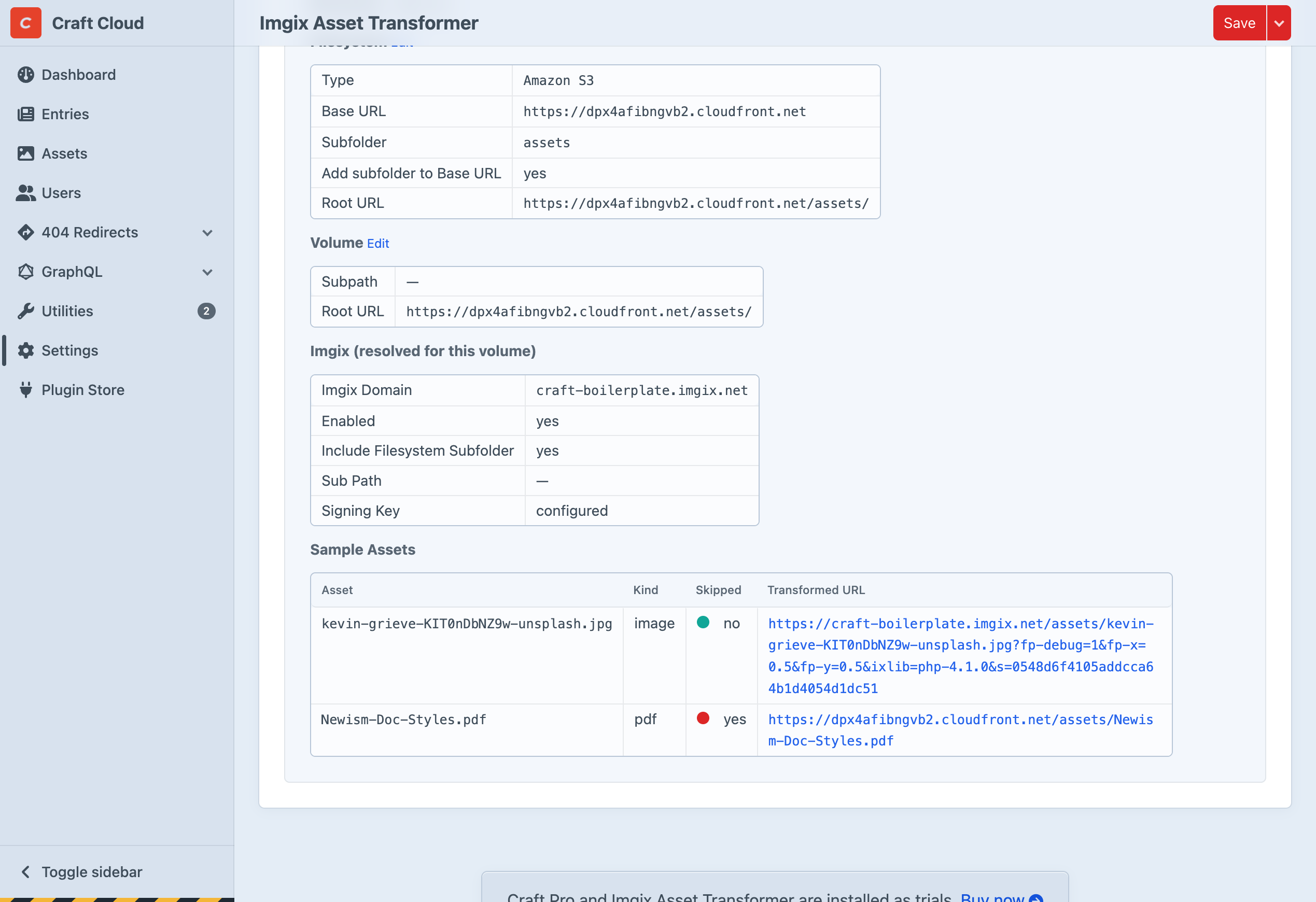
In the sample assets table:
- Skipped: no (green) — the output URL is an Imgix URL
- Skipped: yes (red) — the output URL is the filesystem URL (e.g. S3/CloudFront)
Use this to verify that:
- Image URLs point to your Imgix domain with the correct path
- Non-image assets fall back to the filesystem URL
- The filesystem subfolder and volume subpath are included/excluded as expected