
Configuration
Configuration is managed through config/wallet/wallet.php and environment variables. A starter config directory should have been automatically copied to config/wallet/ on installation with placeholder images and README guides for each platform.
Before configuring settings, you'll need to set up your Apple and Google credentials. See the Setup guide for step-by-step instructions for both Apple Wallet and Google Wallet.
Configuration Debugging
The plugin provides a comprehensive configuration debugging page that shows the resolved settings values for both Apple and Google Wallet, including which values are coming from config files and which are coming from environment variables. This is a great way to verify that your configuration is set up correctly and that your credentials are being read properly.
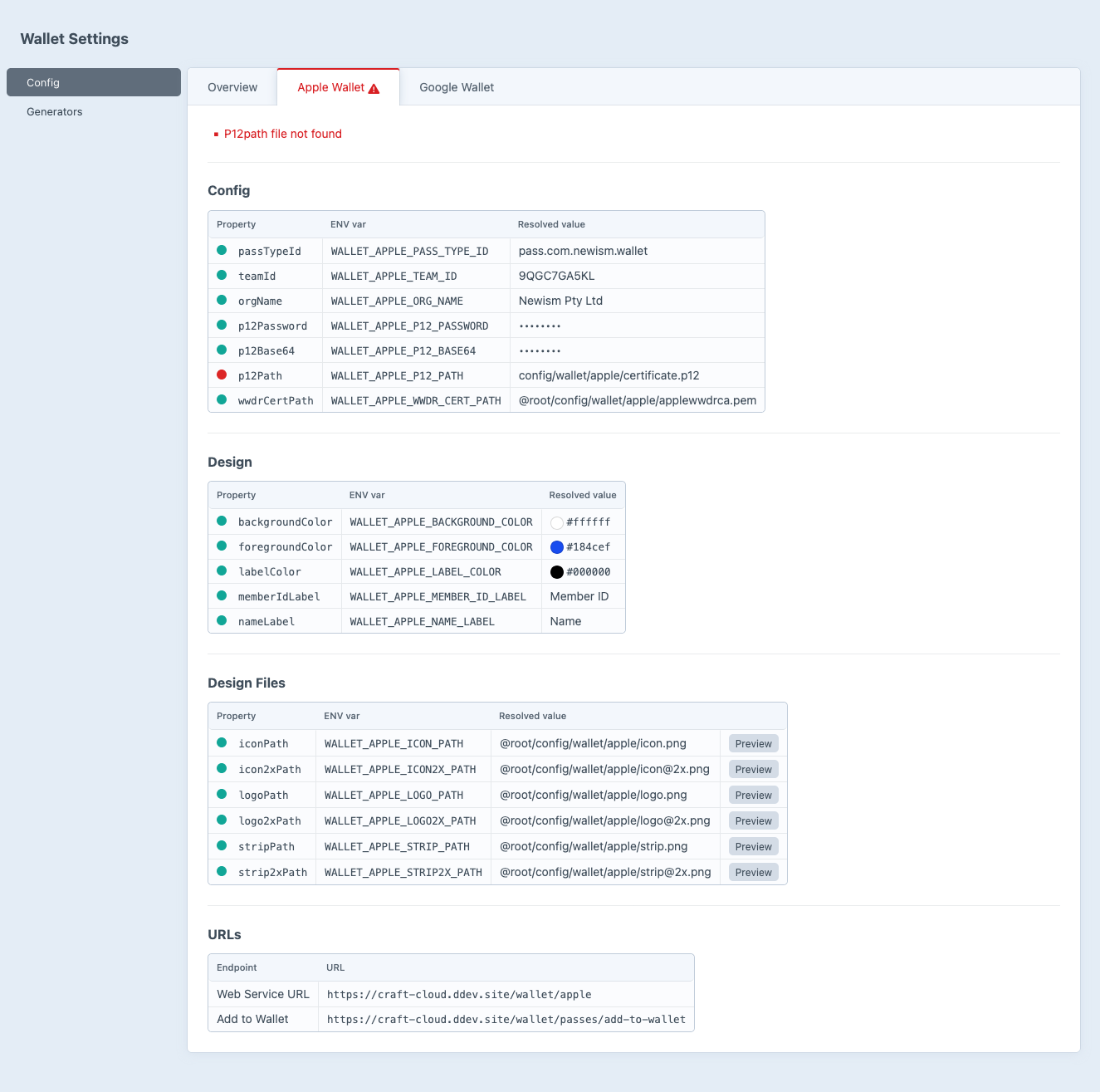
Configuration options
All settings can also be set via environment variables. ENV vars always take precedence over config file values.
Property names are mapped to env vars automatically using SNAKE_CASE with a prefix:
- Apple Wallet:
WALLET_APPLE_prefix (e.g.passTypeId→WALLET_APPLE_PASS_TYPE_ID) - Google Wallet:
WALLET_GOOGLE_prefix (e.g.issuerId→WALLET_GOOGLE_ISSUER_ID)
Apple Wallet Settings
Identifiers
passTypeId
- ENV
WALLET_APPLE_PASS_TYPE_ID- Accepts
string- Default
—
teamId
- ENV
WALLET_APPLE_TEAM_ID- Accepts
string- Default
—
orgName
- ENV
WALLET_APPLE_ORG_NAME- Accepts
string- Default
—
Credentials
p12Password
- ENV
WALLET_APPLE_P12_PASSWORD- Accepts
string- Default
—
p12Base64
- ENV
WALLET_APPLE_P12_BASE64- Accepts
string- Default
—
p12Path
- ENV
WALLET_APPLE_P12_PATH- Accepts
string- Default
@root/config/wallet/apple/certificate.p12
wwdrCertPath
- ENV
WALLET_APPLE_WWDR_CERT_PATH- Accepts
string- Default
@root/config/wallet/apple/applewwdrca.pem
Design
backgroundColor
- ENV
WALLET_APPLE_BACKGROUND_COLOR- Accepts
string- Default
#ffffff
foregroundColor
- ENV
WALLET_APPLE_FOREGROUND_COLOR- Accepts
string- Default
#184cef
labelColor
- ENV
WALLET_APPLE_LABEL_COLOR- Accepts
string- Default
#000000
memberIdLabel
- ENV
WALLET_APPLE_MEMBER_ID_LABEL- Accepts
string- Default
Member ID
nameLabel
- ENV
WALLET_APPLE_NAME_LABEL- Accepts
string- Default
Name
Images
iconPath
- ENV
WALLET_APPLE_ICON_PATH- Accepts
string- Default
@root/config/wallet/apple/icon.png
icon2xPath
- ENV
WALLET_APPLE_ICON2X_PATH- Accepts
string- Default
@root/config/wallet/apple/icon@2x.png
logoPath
- ENV
WALLET_APPLE_LOGO_PATH- Accepts
string- Default
@root/config/wallet/apple/logo.png
logo2xPath
- ENV
WALLET_APPLE_LOGO2X_PATH- Accepts
string- Default
@root/config/wallet/apple/logo@2x.png
stripPath
- ENV
WALLET_APPLE_STRIP_PATH- Accepts
string- Default
@root/config/wallet/apple/strip.png
strip2xPath
- ENV
WALLET_APPLE_STRIP2X_PATH- Accepts
string- Default
@root/config/wallet/apple/strip@2x.png
Google Wallet Settings
Identifiers
issuerId
- ENV
WALLET_GOOGLE_ISSUER_ID- Accepts
string- Default
—
orgName
- ENV
WALLET_GOOGLE_ORG_NAME- Accepts
string- Default
—
classSuffix
- ENV
WALLET_GOOGLE_CLASS_SUFFIX- Accepts
string- Default
membership
Credentials
serviceAccountJsonBase64
- ENV
WALLET_GOOGLE_SERVICE_ACCOUNT_JSON_BASE64- Accepts
string- Default
—
serviceAccountJsonPath
- ENV
WALLET_GOOGLE_SERVICE_ACCOUNT_JSON_PATH- Accepts
string- Default
@root/config/wallet/google/service-account.json
Design
backgroundColor
- ENV
WALLET_GOOGLE_BACKGROUND_COLOR- Accepts
string- Default
#ffffff
subHeader
- ENV
WALLET_GOOGLE_SUB_HEADER- Accepts
string- Default
Member
memberIdLabel
- ENV
WALLET_GOOGLE_MEMBER_ID_LABEL- Accepts
string- Default
Member ID
Images
logoPath
- ENV
WALLET_GOOGLE_LOGO_PATH- Accepts
string- Default
@root/config/wallet/google/logo.png
heroPath
- ENV
WALLET_GOOGLE_HERO_PATH- Accepts
string- Default
@root/config/wallet/google/hero.png
Config File Example
Create config/wallet/wallet.php to set defaults. Env vars will still override any values set here.
use newism\wallet\models\AppleSettings;
use newism\wallet\models\GoogleSettings;

return [
    'apple' => AppleSettings::create()
        ->passTypeId('pass.com.example.membership')
        ->teamId('XXXXXXXXXX')
        ->orgName('My Organisation')
        ->backgroundColor('#000000')
        ->foregroundColor('#d4af37')
        ->labelColor('#a98c2c')
        ->memberIdLabel('Member ID')
        ->nameLabel('Name'),

    'google' => GoogleSettings::create()
        ->issuerId('3388000000022229999')
        ->orgName('My Organisation')
        ->classSuffix('membership')
        ->backgroundColor('#000000')
        ->subHeader('Gold Member')
        ->memberIdLabel('Member ID'),
];
Craft Cloud / Serverless Environments
In serverless environments like Craft Cloud you can't upload files to the server. Instead, store sensitive credentials as base64-encoded environment variables.
Run the setup command to base64-encode your credentials and write them to .env:
php craft wallet/setup/env-base64This reads the files at apple.p12Path and google.serviceAccountJsonPath from your resolved settings, base64-encodes them, and appends (or updates) the following block in your .env:
###> newism/craft-wallet ###
WALLET_APPLE_P12_BASE64="MIIKYgIBAzCCCi..."
WALLET_GOOGLE_SERVICE_ACCOUNT_JSON_BASE64="eyJ0eXBlIjoic2VydmljZV9hY2NvdW50Ii..."
###< newism/craft-wallet ###
When these env vars are set, the plugin uses them automatically. The certificate.p12 and service-account.json files are not needed on the server.
Since the credential files won't exist in cloud environments, set the corresponding path properties to empty via environment variables to avoid file-not-found errors on the settings page:
WALLET_APPLE_P12_PATH=""
WALLET_GOOGLE_SERVICE_ACCOUNT_JSON_PATH=""
You can re-run the command any time you update your credentials.